Unlocking Festive Creativity with the Christmas Style Editable Text Effect
The holiday season brings a unique set of challenges for designers, marketers, and content creators. While the spirit of giving is universal, the visual language required to capture it demands precision, warmth, and a touch of magic. In this digital landscape, where static images often fail to convey the dynamic energy of a celebration, tools that offer flexibility become indispensable. The Christmas Style Editable Text Effect stands out as a specialized solution designed specifically for Adobe Illustrator users who need to produce high-quality, scalable typography without compromising on creative control.
It is crucial to understand the nature of this resource before diving into its application. This is not merely a downloadable font file like those found in standard type libraries. Instead, it is a sophisticated font effect built within the Adobe Illustrator environment. This distinction is vital because it dictates how the asset behaves during the design process. It cannot be opened or utilized directly in other software such as Microsoft Word, Photoshop, or Canva. Its power lies entirely within the vector-based ecosystem of Adobe Illustrator CS6 and later versions, utilizing an EPS file format that preserves 100% editability.
The Technical Foundation: Why Vector Matters
To appreciate the value of this text effect, one must first grasp the importance of vector graphics in professional design. Unlike raster images, which are made of pixels and lose quality when scaled up, vectors are mathematical paths that remain crisp at any size. The Christmas Style Editable Text Effect leverages this technology to ensure that whether you are designing a business card or a billboard, the text remains sharp and clear.
The file is provided in the ADOBE ILLUSTRATOR EPS CS6 file format. This specific format choice is intentional, ensuring broad compatibility with the Illustrator software suite while maintaining the integrity of the complex layer structures and appearance effects that define the Christmas aesthetic. When you open this file, you are not looking at a flattened image; you are looking at a fully constructed composition. Every letter, every ornament, and every snowflake is an individual object that can be manipulated independently.
This level of access transforms the workflow. Instead of being limited to the default options of a pre-made font, you have the ability to alter stroke weights, adjust color palettes, modify spacing, and even reshape individual characters. For professionals who demand perfection, this capability is the difference between a generic template and a bespoke design.
Core Characteristics of the Design Asset
The defining feature of this resource is its comprehensive editability. The prompt specifies that the file contains 100 editable elements. In the context of a complex typographic effect, this number represents the granularity of control available to the user. These elements might include:
- Individual Glyphs: Each letter of the alphabet and numerals can be separated and styled differently.
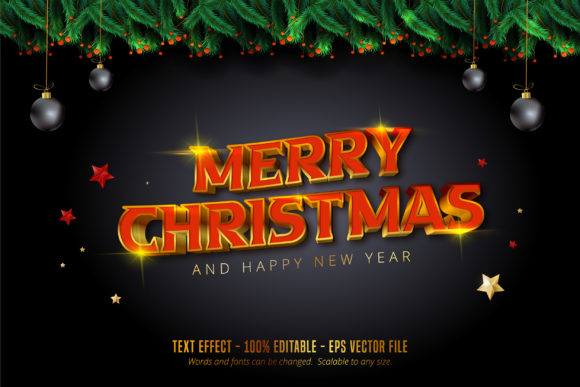
- Decorative Elements: Holly leaves, berries, stars, and snowflakes attached to the letters are distinct objects.
- Background Textures: Subtle gradients or patterns that give depth to the text can be toggled or removed.
- Color Swatches: The effect relies on specific color layers that can be instantly swapped to match brand guidelines.
This structure allows for what is known as "non-destructive editing." You can experiment with different looks—perhaps changing the color from traditional red and green to a modern gold and navy blue scheme—without ever losing the original structure of the design. Once satisfied, the final output can be exported in various formats suitable for print or web use.
Practical Applications Across Industries
The versatility of the Christmas Style Editable Text Effect extends far beyond simple greeting cards. Because it is scalable to any size, it serves a wide array of industries and use cases. Let us explore how different sectors utilize this tool to enhance their seasonal communications.
Marketing and Branding
For businesses, the holiday season is a critical time for engagement. Marketing teams often struggle to maintain brand consistency while adopting festive themes. Using this editable effect, a company can take their standard logo and seamlessly integrate it into a holiday campaign. They can change the "Merry Christmas" text to match their corporate colors while keeping the festive texture intact. This ensures that the brand remains recognizable even during the most whimsical times of the year.
Educational Resources
Educators and instructional designers frequently create materials for students that require engaging visuals. Whether it is a worksheet about winter holidays or a presentation slide for a history lesson on Christmas traditions, the ability to customize text is essential. Teachers can use this effect to create custom certificates, bulletin board headers, or interactive digital flashcards. The fact that the text is easily editable means they can quickly adapt the content for different age groups or languages without needing advanced graphic design skills.
Event Planning and Hospitality
Hotels, restaurants, and event planners rely heavily on visual cues to set the mood. A restaurant menu, a reservation card, or a lobby display requires a touch of elegance. The Christmas Style Editable Text Effect allows these professionals to create signage that feels both professional and celebratory. Since the file is scalable, the same design can be used for a small table tent and then scaled up for a large entrance banner without pixelation.
Digital Content Creation
Social media managers and bloggers are constantly searching for high-quality assets that stand out in crowded feeds. While this effect is primarily designed for print production via Illustrator, the resulting files can be exported as high-resolution PNGs or JPEGs for social media platforms. The ability to tweak the design allows creators to generate multiple variations of a single theme, preventing audience fatigue from seeing the exact same image repeatedly.
Workflow Integration and Ease of Use
One of the primary concerns for any designer considering a new asset is the learning curve. Fortunately, the description highlights that this tool is very easy to edit font and text. This simplicity is achieved through the logical organization of the Illustrator layers. When a user opens the file, the layers panel typically presents a clear hierarchy, separating the base text from the decorative overlays.
The workflow generally involves selecting the text object, accessing the character properties, and modifying the attributes. Because the effect is applied as an appearance attribute rather than a converted outline, the user retains the ability to change the actual words. If a client wants to change "Merry Christmas" to "Happy Holidays," the designer can simply type the new text, and the effect will automatically apply to the new characters, provided the font family matches the underlying structure.
This efficiency saves hours of manual labor. In the past, achieving a similar look might have required tracing over images or manually placing clip art around each letter. With this effect, the heavy lifting is done by the code and structure of the EPS file, leaving the designer free to focus on the creative strategy.
Considerations for Implementation
While the benefits are numerous, it is important to approach this tool with a clear understanding of its limitations. As noted, the Christmas Style Editable Text Effect is exclusive to Adobe Illustrator. This means that if your team uses a different design stack, such as Affinity Designer or CorelDRAW, you will need to import the file carefully. While some vector data may transfer, the complex appearance effects specific to Illustrator's rendering engine may not translate perfectly. Therefore, it is best suited for workflows centered around the Adobe Creative Cloud ecosystem.
Furthermore, the requirement for an EPS CS6 file format implies that older versions of software might struggle to open the file, and newer versions should handle it without issue. Users should ensure their software is updated to the latest version of Illustrator to take full advantage of the scalability and editing features. Additionally, while the text is editable, the artistic style is fixed. You cannot fundamentally change the "style" of the effect (e.g., turning a snowy script into a bold block font) without manually altering the vector paths, which requires a higher level of design expertise.
The Future of Seasonal Typography
As we move further into a digital-first world, the demand for high-fidelity, customizable templates continues to grow. The trend is shifting away from static, one-size-fits-all solutions toward dynamic assets that empower the creator. The Christmas Style Editable Text Effect represents this shift. By offering a bridge between rigid templates and blank canvases, it provides the perfect middle ground for professionals who need speed but refuse to sacrifice quality.
The ability to scale to any size ensures longevity. A design created today for a website header can be repurposed next year for a physical storefront sign. This sustainability in design reduces waste and increases the return on investment for creative projects. Whether you are a hobbyist crafting a personal gift tag or a corporate marketing director launching a global campaign, the principles of scalability and editability remain paramount.
Conclusion on Creative Potential
In summary, the Christmas Style Editable Text Effect offers a robust, flexible, and professional solution for holiday-themed typography. By understanding that this is a specialized effect rather than a standard font, users can better integrate it into their Adobe Illustrator workflows. Its capacity for 100% editability, combined with its scalability and ease of use, makes it a valuable asset for a diverse range of applications.
From enhancing brand identity to supporting educational initiatives, the impact of this tool is felt across the spectrum of design and communication. It empowers creators to tell their stories with the festive flair that the season deserves, ensuring that the message of "Merry Christmas" is delivered with clarity, beauty, and precision. For anyone working in the Adobe Illustrator environment, mastering this effect is a step toward more efficient and impactful seasonal design.