Ice Cream - Adaptive Logo: Building a Versatile Brand Identity
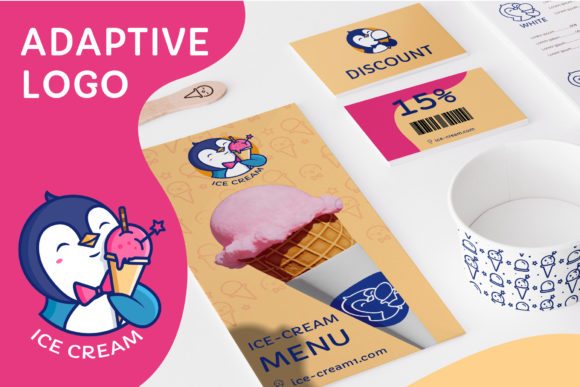
In the crowded marketplace of visual branding, few elements are as crucial yet often misunderstood as the adaptability of your corporate identity. The Ice Cream - Adaptive Logo offers a unique solution for businesses looking to establish a memorable presence across every possible medium. At its core, this design features a charming brand character—a cute penguin enjoying an ice cream cone. This isn't just a static image; it is one of the most active elements of a comprehensive corporate identity, designed to make a company stand out through personality and flexibility.
Many entrepreneurs and designers assume that purchasing a logo means receiving a single file that will work everywhere. This is a common misconception that can lead to significant headaches down the road. A logo that looks perfect on a website header might become unrecognizable when shrunk down for a business card or pixelated when blown up for outdoor advertising. The Ice Cream - Adaptive Logo solves this by providing four distinct sizes tailored for specific use cases, ensuring your brand maintains its integrity regardless of the scale.
Understanding the Scope of Adaptation
The primary value of this asset lies in its multi-format versatility. When you acquire the Ice Cream - Adaptive Logo, you are not just getting a picture; you are receiving a complete toolkit for your marketing campaigns. The package includes files formatted for various platforms, from the digital realm to physical print. You will receive versions in PNG, JPG, EPS, AI, and PDF formats, covering everything from web icons to high-resolution printing requirements.
A frequent mistake made by beginners is attempting to resize a raster image (like a JPG) for large-scale applications like billboards. This results in blurry, jagged edges that destroy professional credibility. Conversely, trying to use a vector file (EPS or AI) directly in a simple email client without conversion can cause compatibility issues. The included adaptive set prevents these errors by offering pre-scaled assets. For instance, the electronic version icons are optimized for screens, while the souvenir product versions ensure crisp lines on merchandise.
Why the Penguin Character Matters
The central figure of this campaign is more than just decoration; it serves as the emotional anchor of your brand. A cute penguin eating ice cream allows a business to inject warmth and approachability into its communication strategy. In marketing psychology, characters help humanize corporations. However, using a character effectively requires consistency. If your logo looks different on your social media profile than it does on your invoice, customers become confused. The Ice Cream - Adaptive Logo ensures that whether the character is tiny on a favicon or massive on a billboard, the expression and style remain identical.
When selecting a brand character, many creators overlook the importance of color separation and background transparency. This package addresses that by including a PNG file without a background. This allows you to place the penguin on any colored surface without unsightly white boxes surrounding the image. It is a small detail that makes a massive difference in the final presentation of your materials.
Navigating File Formats and Software Requirements
One area where users frequently stumble is understanding which software opens which file type. The ZIP archive contains a mix of vector and raster files, each serving a specific purpose. If you attempt to open the EPS or AI clipart with a standard image viewer or Photoshop, you may find the layers locked or the resolution limited. These vector files are specifically designed to be opened with Adobe Illustrator, allowing you to edit the text and change fonts without losing quality.
On the other hand, the PNG clipart is intended for Photoshop or similar raster editors. Trying to edit the path of a PNG in Illustrator will yield poor results compared to using the native AI source. Understanding this distinction is vital for maintaining efficiency. If you need to create a pattern for wrapping paper or a textile product, the bonus pattern files provided in JPG, PNG, and PDF formats save you hours of manual design work.
Common Pitfalls in Customization
While the Ice Cream - Adaptive Logo allows for text editing and font changes, there are limits to what you should alter. A common error is changing the font to something that clashes with the playful nature of the penguin character. The goal is to enhance the character, not compete with it. If you choose a heavy, industrial font for a cute ice cream brand, the message becomes confusing. Always check the legibility of your text against the complexity of the illustration.
Another oversight involves the "four size" concept. Some users try to force one size to fit all contexts, ignoring the specific dimensions provided. For example, using the outdoor advertising version for a mobile app icon often results in too much detail being lost on a small screen. Conversely, using the business card version for a storefront sign means the details will be invisible from a distance. Trust the four adapted sizes; they have been calculated to perform optimally in their respective environments.
What to Expect and What Is Missing
To avoid frustration, it is essential to know exactly what is included in the purchase. The Ice Cream - Adaptive Logo delivers a robust set of tools: four adapted logos in PSD format, one logo with four sizes in EPS10 and AI, and bonus pattern files in JPG, PNG, and PDF. The inclusion of the PSD files allows for advanced layer manipulation if you are comfortable with Photoshop's interface.
However, there are items explicitly excluded from the package that buyers often expect to find. Fonts are not included in the download. This is a standard industry practice to respect copyright laws, but it means you must select a font that matches the vibe of the penguin yourself. Additionally, mockups are not provided. While this gives you the freedom to visualize the logo in any context, it also means you are responsible for creating your own presentations to show clients or stakeholders.
Evaluating Quality Before Use
Before integrating this asset into your business operations, take time to inspect the vector files. Open the AI file in Illustrator and zoom in to 500%. Check that the curves are smooth and the anchor points are clean. If you see jagged lines at high magnification, the file may be corrupted or poorly traced. Similarly, verify the transparency of the PNG files by placing them over a dark background. Any residual halos or white edges will need to be cleaned up manually.
For those planning to use the logo for outdoor advertising, ensure you have the high-resolution PDF or EPS version. Do not rely on the JPG preview found in the folder. The difference in clarity between a compressed JPEG and a true vector file is stark when printed at large scales. By adhering to the correct file usage guidelines, you protect your investment and ensure your brand looks professional in every interaction.
The Ice Cream - Adaptive Logo is a powerful tool for anyone looking to build a cohesive brand identity. Whether you are a freelancer setting up a new portfolio, a small business owner launching a summer campaign, or a marketer managing a global brand, the flexibility of this adaptive system provides a solid foundation. By avoiding common technical mistakes and respecting the specific strengths of each file format, you can maximize the impact of your cute penguin character and create a lasting impression on your audience.